
Windows 11 is getting a way to rebuild a PC that won't start, but it wipes local files

Microsoft is rolling out a Windows 11 recovery option that can rebuild a PC that refuses to start using a fresh system image and device drivers downloaded through Windows Update, without a USB installer. Cloud rebuild is part of the optional October preview update for versions 25H2 and 26H2.
The feature could save a trip to another computer to create installation media, but there is a major catch: Cloud rebuild removes the locally stored files, accounts, apps and settings on the system disk. It is a full reinstall, not a repair that keeps your files intact.
The tool arrives through Microsoft's KB5127936 preview update. Its features are rolling out gradually, so installing the optional update does not necessarily mean the option will appear immediately on every eligible PC.
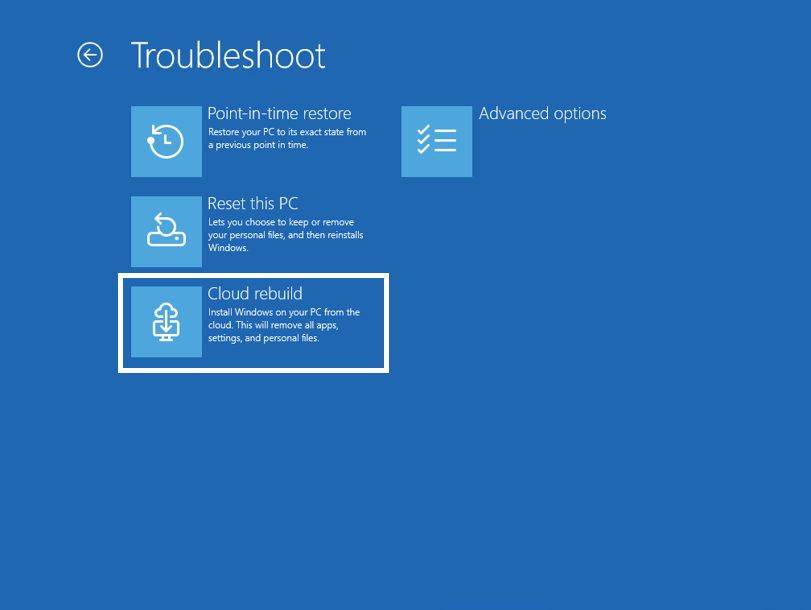
The Cloud rebuild option in Windows Recovery Environment. Image: Microsoft
How Cloud rebuild gets a broken PC running again
On a working installation, the entry point is Settings > System > Recovery > Rebuild PC. If Windows will not start after repeated attempts, the PC can enter the Windows Recovery Environment, where Microsoft lists the path as Troubleshoot > Recovery and uninstall > Cloud rebuild. Screen labels may vary.
The recovery environment needs a working network connection. Microsoft says compatible saved Wi-Fi profiles can be reused in Windows Recovery, while a wired Ethernet connection is another route. A healthy recovery environment and a compatible network driver are prerequisites; a damaged recovery environment or networking hardware can still leave you needing another recovery method.
Once connected, Cloud rebuild checks the target Windows build, edition and language. It downloads the operating system and device drivers from Windows Update, then asks for confirmation before rebuilding the system. The user is shown a data-loss warning before the operation begins.
Back up before using either removal option
Microsoft offers a faster remove-files option and a separate remove-and-sanitise option for a more thorough erase. The standard option reformats the system disk and removes local files, apps, accounts and settings. Files may still be recoverable with specialised tools; either way, it is not a substitute for a backup.
The sanitise option asks storage hardware to erase the selected disks before reinstalling Windows. On a PC with multiple disks, the flow can offer a choice between the Windows disk and all disks. Microsoft warns that sanitisation is irreversible. The feature relies on a supported drive and Windows cannot independently verify the erase, so check the hardware and the selected disks carefully.
Files already stored in cloud services such as OneDrive are not removed by Cloud rebuild, according to Microsoft's documentation. That does not mean every local file has been synced, so check your backups before proceeding where possible.
Cloud rebuild differs from the existing Reset this PC options because it downloads both the target Windows image and device drivers and does not depend on the installed system remaining healthy. If the recovery environment or network cannot be used, Microsoft points to a recovery drive, installation media or the PC manufacturer's recovery tools instead.

